文章
Interaction mechanism
Refer to NTCAN Application Developers Manual document charpter
- 2.3.2 Interaction
- 4.1.1 canOpen, Mode flag NTCAN_MODE_NO_INTERACTION, NTCAN_MODE_MARK_INTERACTION
- 6.2.3 CMSG, len in Rx Bit 5 Frame received via Interaction
What is Interaction mechanism?
A standard CAN controller usually does not receive its own transmitted CAN message. But this feature is supported in all esd CAN driver implementation and called Interaction.
- Interaction机制是实现在esd CAN driver中的。
- Interaction机制能确保收到的CAN消息是自己节点在CAN总线上发送成功的CAN消息,避免了如下情况的发生。 如下图所示的情况,在同一台主机内,运行三个应用程序(A,B和C)。A发送的CAN消息,虽然在CAN总线上没有传送成功,但是此CAN消息通过IPC方式从A的Tx-FIFO传送到B和C的Rx-FIFO中,使得B和C收到CAN消息。从而B和C会误以为A的CAN消息发送成功了。
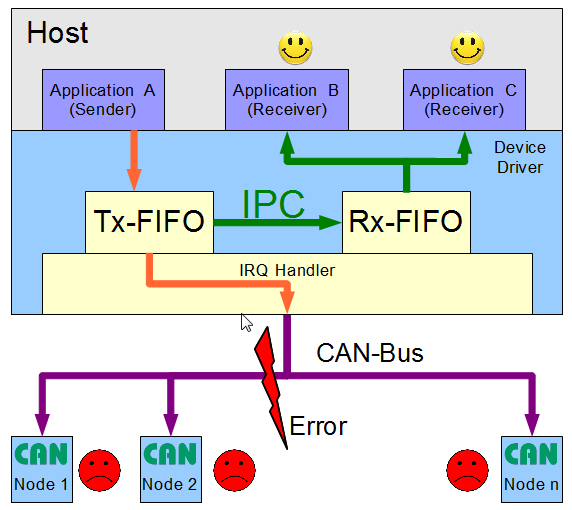
- Interaction机制能确保本地接收器收到的CAN消息的时间顺序与总线中其他CAN装置收到的CAN消息的时间顺序一致。
- 因为Interaction机制需要确保CAN消息首先要在物理总线上传送成功后才能被自己主机上的其他软件进程收到,所以使用esd CAN装置发送CAN消息前必须要保证总线物理连线正常,且总线上至少需要有另一个CAN装置,一起形成一个完整的CAN总线结构。
- Interaction机制是default开启的,但是可以通过NTCAN API对其进行操作。
NTCAN API for Interaction related operation
- 关闭和打开Interaction机制。
- 判断接收到的CAN消息是否是通过Interaction机制传送来的,还是从CAN总线中其他CAN装置发送来的。
Example code
interaction.c: 程序循环用canRead()方式读取CAN消息,并将其打印出来。发送11-bit ID=0的消息可以终止程序运行。编译执行./interaction on|off|mark,至少要带一个参数,从on, off和mark中三选一。
- 参数on:开启Interaction模式,总线上所有11-bit ID的CAN消息都会被读取上来。
- 参数off:关闭Interaction模式,总线所有11-bit ID的,从其他CAN装置发送的CAN消息都会被读取上来,但不会读取自己主机发送的CAN消息。
- 参数mark: 开启Interaction模式,总线上所有11-bit ID的CAN消息都会被读取上来,并且如果收到的是自己主机发送的CAN消息,会标注"!!!NTCAN_INTERACTION message!!!"。
Output
- In Linux Debian Desktop PC of demo system, run
./interaction mark - In the same Linux Debian PC, run
sudo cantest 50 3 0x1 0xA 0 10 100 50 5000 0 1 0x22 0x33to send a message. "!!!NTCAN_INTERACTION message!!!" can be seen. - In Win10 PC of demo system, use CANreal to send CAN 11-bit ID=0x601 message, there is no "!!!NTCAN_INTERACTION message!!!".
- In Win10 PC, use CANreal to send CAN 11-bit ID=0 message to exit program.
bobtu@debian:~/ntcantest$ ./interaction mark
Mark Interaction messages!
Send CAN msg with 11-bit ID=0 to Exit Program!
!!!NTCAN_INTERACTION message!!!
Id of received message :1!
Len of received message :2!
Rtr of received message :0!
Byte 0 of received message :22!
Byte 1 of received message :33!

Id of received message :601!
Len of received message :8!
Rtr of received message :0!
Byte 0 of received message :23!
Byte 1 of received message :0!
Byte 2 of received message :16!
Byte 3 of received message :1!
Byte 4 of received message :8!
Byte 5 of received message :1!
Byte 6 of received message :50!
Byte 7 of received message :22!

Id of received message :0!
Exit program!