文章
Remote access to esd EtherCAT Workbench
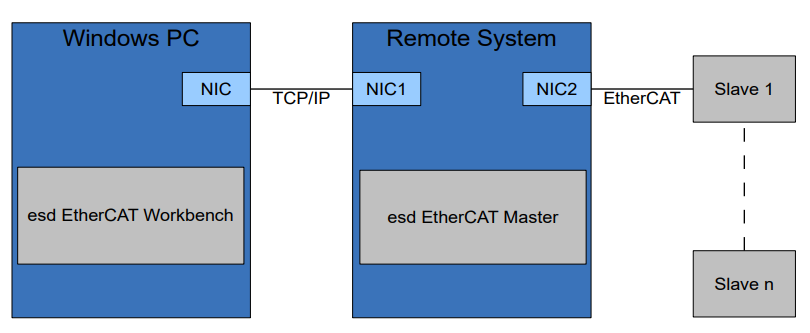
esd EtherCAT Master 主站允许远端的 esd EtherCAT Workbench 利用 TCP/IP 方式接入主站,进行控制与监控,从而为主站的运行提供了可视化的界面。 远程接入提供了两种模式:Control mode 和 Monitor mode。
Refer to section 3.13 Remote Access of EtherCAT Master Application Developers Manual and EtherCAT Workbench Manual for more detailed information.
Control mode
In Control Mode the I/O cycle runs autonomously on the target and the remote client (Workbench) has full control over the EtherCAT slave segment. While the Control Mode is active, the application is not allowed to exchange data with the EtherCAT slaves. In Control Mode the call to ecmStartRemotingServer() will block and will not return until the application calls ecmStopRemotingServer() (from another thread).
EtherCAT Master side
Step 1: 在EtherCAT Master主机端,连接一个任意 EtherCAT Slave 装置。
Step 2: 在EtherCAT Master主机上编译如下 c 文件,使用root权限运行,如 sudo ./ecmRaControlMode
Example code: ecmRaControlMode.c
与 control mode 相关的代码如下:
printf("Start remote server -- control mode ... \n");
result = ecmStartRemotingServer("Stream:0.0.0.0@6368", ECM_FLAG_REMOTE_CONTROL_MODE);
if (result != ECM_SUCCESS) {
    printf(" - ecmStartRemotingServer() Failed with %s\n", ecmResultToString(result));
    ecmInitLibrary(NULL);
    return(-1);
}

/************************************/
void *stopServer(void *arg)
{
    ecmSleep(1000000); // after 1000 seconds, stop the server.
    printf("Terminate remote server ...\n");
    ecmStopRemotingServer();
}

/************************************/
if(pthread_create(&thread_id1,NULL,stopServer,NULL))
{
    printf("pthread_create() failed.\n");
    return -1;
}
EtherCAT Workbench side
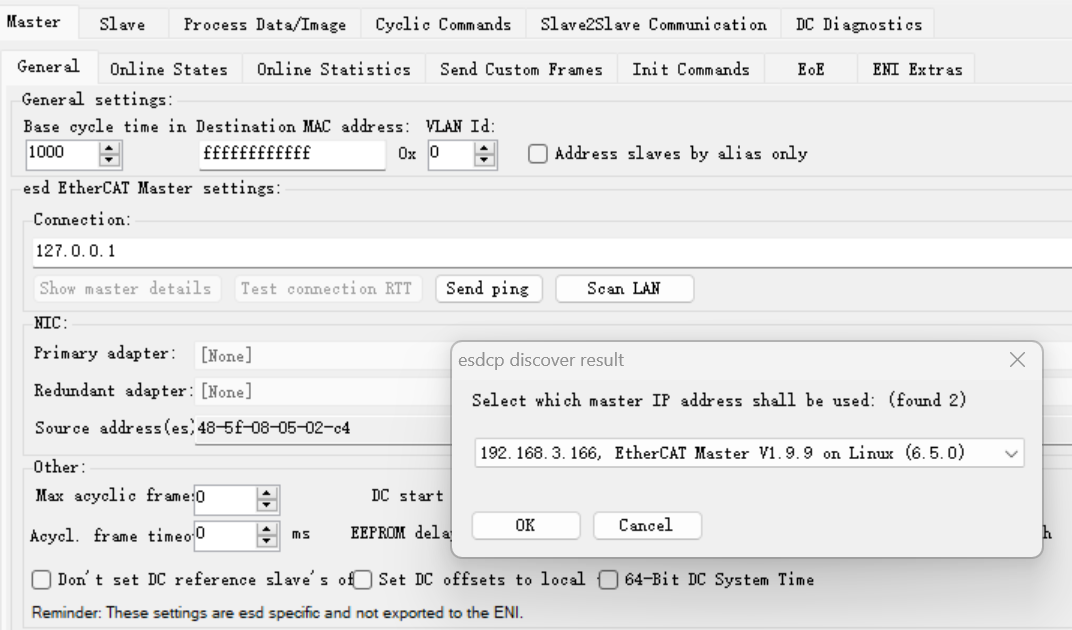
Step 1: 确保如上的 ecmRaControlMode 程序运行起来,在 Workbench 中点击 Master -> Scan LAN ,应该会找到网络中的 EtherCAT Master 电脑信息,如下图。点击"OK",在"Connection:"栏位上会将找到的IP地址填入,如"192.168.3.166"。 Step 2: Workbench 可以完全控制 Master端的网络。点击 Free Run 后,可以进行如读写Slave memory 或 CoE,配置 Process Data 等操作。配置完毕后也生成 ENI 文件供 Master 端后续的应用程序使用。
Monitor mode
以下示例 ecmMonitorMode.c 演示如何在 EtherCAT Master 端加入代码,使得程序运行后,同一网络内的 EtherCAT Workbench 可以利用TCP/IP方式远程接入此 EtherCAT Master 的电脑,通过 Monitor Mode 的方式监控 Process Image 的变化。
EtherCAT Master side
Step 1: 在EtherCAT Master主机端,连接一个esd ECX-DIO8 slave装置。
Step 2: 在EtherCAT Master主机上编译如下 c 文件,并将如下 ENI 文件拷贝至与编译好的可执行文件同一目录内,使用root权限运行,如 sudo ./ecmRaMonitorMode
Example code: ecmRaMonitorMode.c ENI file: monitor_mode_single_ecxdio8.xml
与 monitor mode 相关的代码如下:
printf("Start remote server -- monitor mode ... \n");
/* You can either use defined macro to generate ulFlags*/
// uint32_t ulFlags;
// ulFlags = ECM_FLAG_REMOTE_MONITOR_MODE;
// ECM_SET_REMOTE_SERVER_PRIO(ulFlags, 50);
// ECM_SETUP_REMOTE_WATCHDOG(ulFlags, 5);
// result = ecmStartRemotingServer("Stream:0.0.0.0@6368", ulFlags);
/* Or you can input the hex value 0x00320501 directly for ulFlags. */
result = ecmStartRemotingServer("Stream:0.0.0.0@6368", 0x00320501);
if (result != ECM_SUCCESS) {
    printf(" - ecmStartRemotingServer() Failed with %s\n", ecmResultToString(result));
    ecmInitLibrary(NULL);
    return(-1);
}

/*************************/
cfgInitData.cfgDataMaster.ulFlags |= ECM_FLAG_MASTER_REMOTE_INSTANCE;

/*************************/
printf("Terminate remote server ...\n");
ecmStopRemotingServer();
EtherCAT Workbench side
Step 1: 在 Workbench 中载入 Workbench project file: monitor_mode_single_ecxdio8_autosave.eew 。 Step 2: 确保如上的 ecmRaMonitorMode 程序运行起来,在 Workbench 中点击 Master -> Scan LAN ,应该会找到网络中的 EtherCAT Master 电脑信息,如下图。点击"OK",在"Connection:"栏位上会将找到的IP地址填入,如"192.168.3.166"。
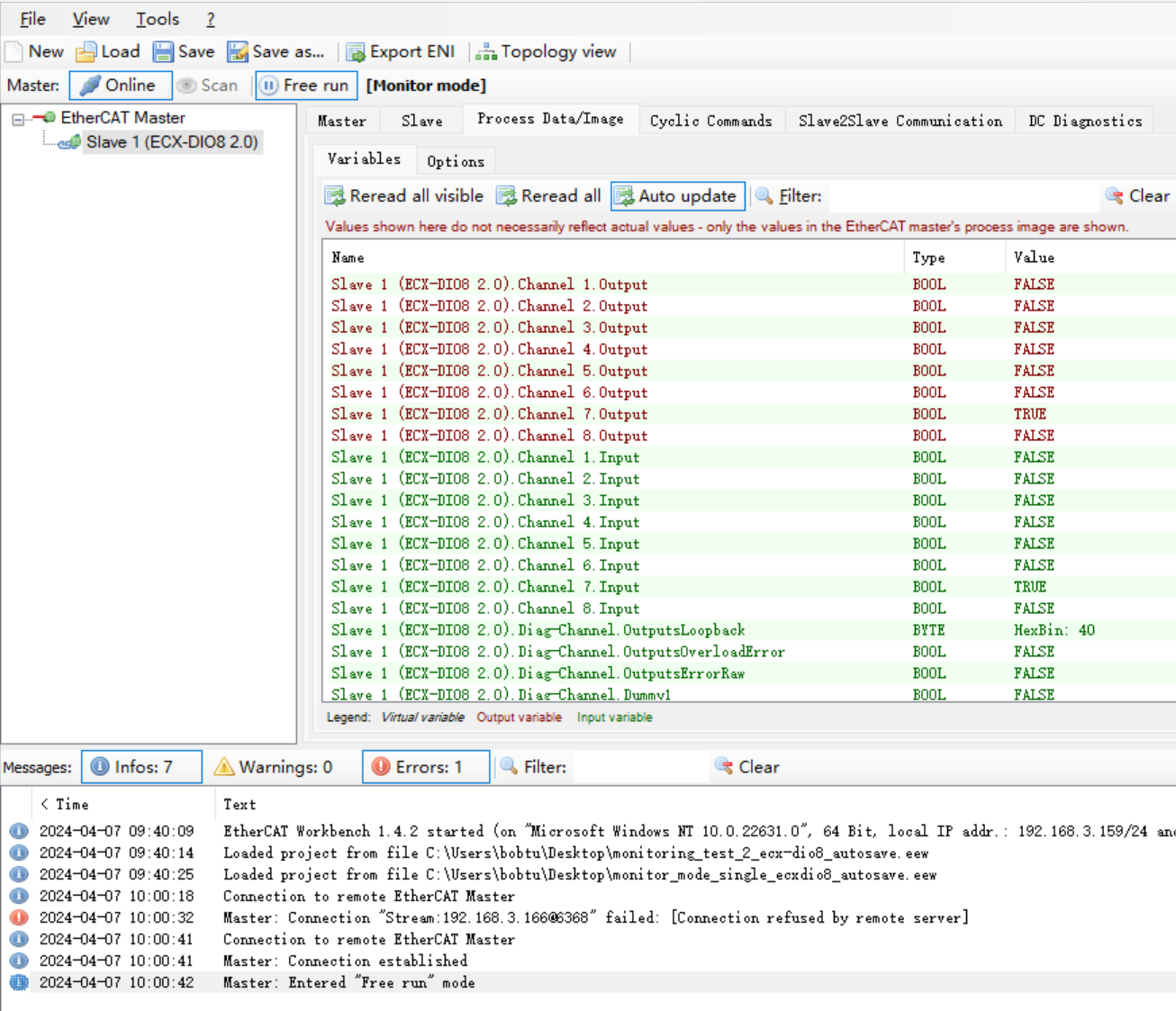
Step 3: 点击 Online 按钮后,Workbench 自动进入 Free Run ,并且显示 "[Monitor mode]"。在 Process Data/Image 中,点击 Auto update 后,Process Image 的数据变化都会更新显示出来。